The JoesScanner App Is Almost Here
A lot of you have been asking for this, and it’s finally time to share it: a dedicated JoesScanner application is on the way.
This project has taken months of steady work, long nights, and a lot of learning. I hadn’t written real code in almost 20 years before starting this, so jumping back into modern development tools and frameworks was a challenge by itself. But piece by piece, the app came together, and it is now far enough along that I can give you a full preview.
This will be the official desktop client for the JoesScanner service, built specifically for real time monitoring, clean audio playback, and user control over what you hear.
First Look: Live Screenshots
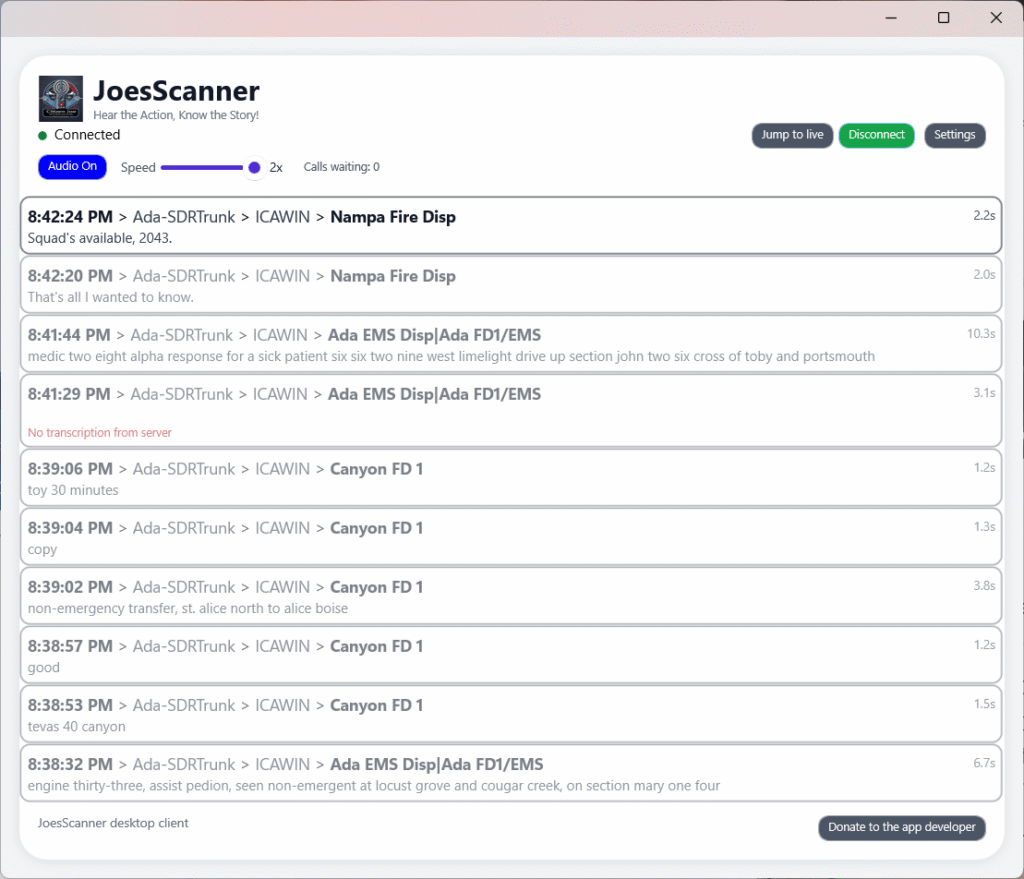
Main Screen
Settings Screen
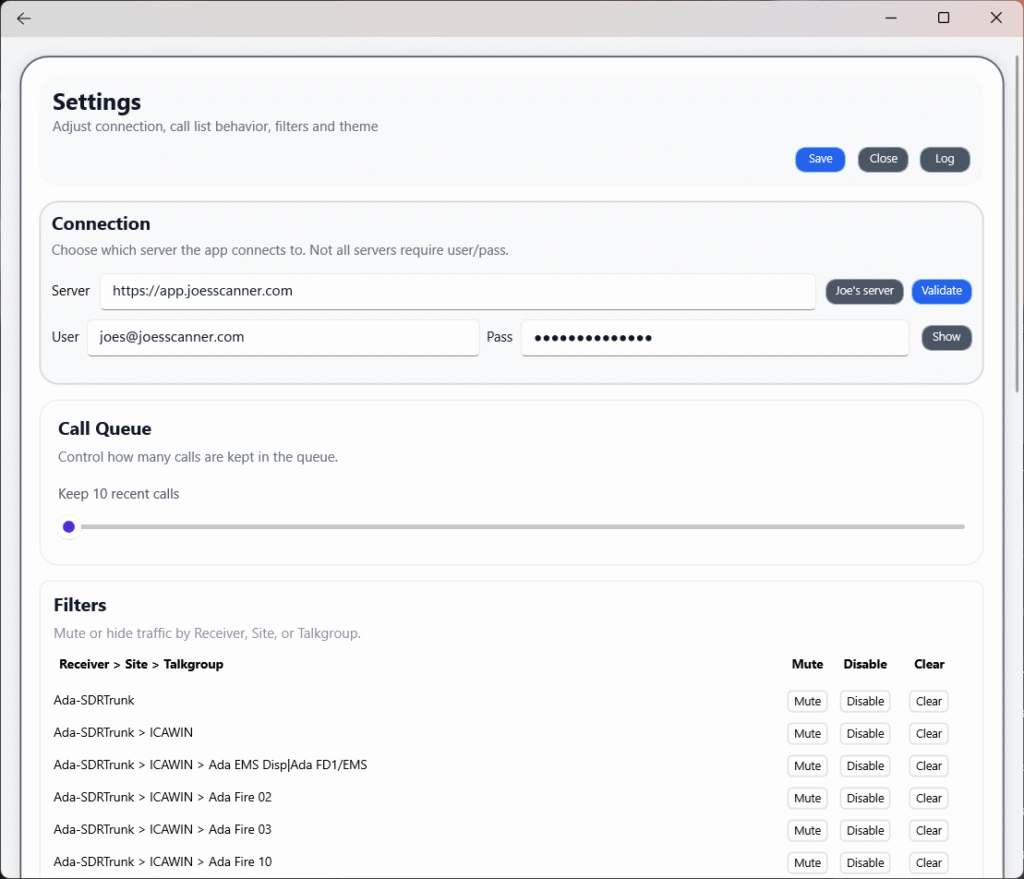
These screenshots are taken directly from the current build of the app using live data from the JoesScanner system.
Built For Real World Listening
The entire design is centered around how scanning is actually used: long sessions, bursts of activity, catching up on backlogged calls, and filtering out noise when things get busy.
A few highlights:
Clean, Organized Call List
The main screen provides:
- Time of each call
- Receiver, site, and talkgroup path
- Transcriptions when available
- Call length displayed on the right
- Smooth scrolling of recent activity
Current activity stays at the top where it belongs.
Connection Controls Up Front
At the top of the app you’ll see:
- Connection status
- Audio On or Off
- Playback speed slider
- Calls waiting counter
- Jump to live, Disconnect, and Settings buttons
Everything is visible at a glance.
Smart Playback Speed
One of the most useful features is the playback speed slider.
It automatically activates only when there is a backlog of calls waiting to be played. When the system gets busy and calls pile up, you can increase speed to catch up. When you’re fully caught up, the slider disengages and audio plays at normal speed.
This keeps listening natural during quiet periods and gives you the tools to keep up when traffic spikes.
Powerful Filters
The filter system lets you control traffic at multiple levels:
Receiver > Site > Talkgroup
For each item you can:
- Mute: Temporarily hide audio from that source
- Disable: Fully block new calls from that item
- Clear: Remove filtering rules and let traffic flow again
This makes it easy to trim out unwanted channels or narrow your focus during a specific event.
Adjustable Call Queue
In Settings you can choose how many recent calls to keep. If you prefer only a few calls in history, you can lower it. If you want a deeper backlog to review, you can increase it.
The queue works together with the speed slider and calls-waiting counter so you always know how far behind real time you are.
Simple, Useful Connection Settings
The Connection panel includes:
- A server field with a shortcut to automatically fill in the JoesScanner default
- Your standard login (user/pass)
- A Validate button to test credentials
- A Show button to toggle password visibility
Once saved, everything persists automatically.
Logging Tools Included
There’s a built-in log viewer for troubleshooting. You can:
- Review connection information
- Check for warnings or temporary network issues
- Close the log when done
- Download the log as a text file with a timestamped filename
This is especially useful during setup or if anything unexpected happens.
Months Of Work Behind The Scenes
This app represents a major effort over several months. Relearning development after 20 years, catching up with modern .NET, MAUI, and asynchronous audio streaming, and then turning all that into a polished user experience has been a huge undertaking.
But the end result is taking shape, and I’m excited to share it with you.
Coming Soon
The app is nearly ready for public release. The last step is fine tuning, packaging, and preparing installation instructions.
Another post will go up once everything is ready to download.
Thank you all for supporting JoesScanner and being part of this community. This app is built for you, and I’m looking forward to getting it into your hands.
Donate to continue supporting growth of this app and the overall service.
Thanks
-Joe
Hear the Action, Know the Story!